Multi-Batch Release
Overview
Multi-batch strategy is a special kind of canary release that updates application replicas in predefined stages without requiring separate canary workloads or traffic routing configurations. This approach is particularly suited for:
- Applications running multiple replicas
- Scenarios where gradual rollout validation is needed without complex traffic management
- Workloads that can be validated through replica-level monitoring rather than traffic-based analysis
Strategy Process
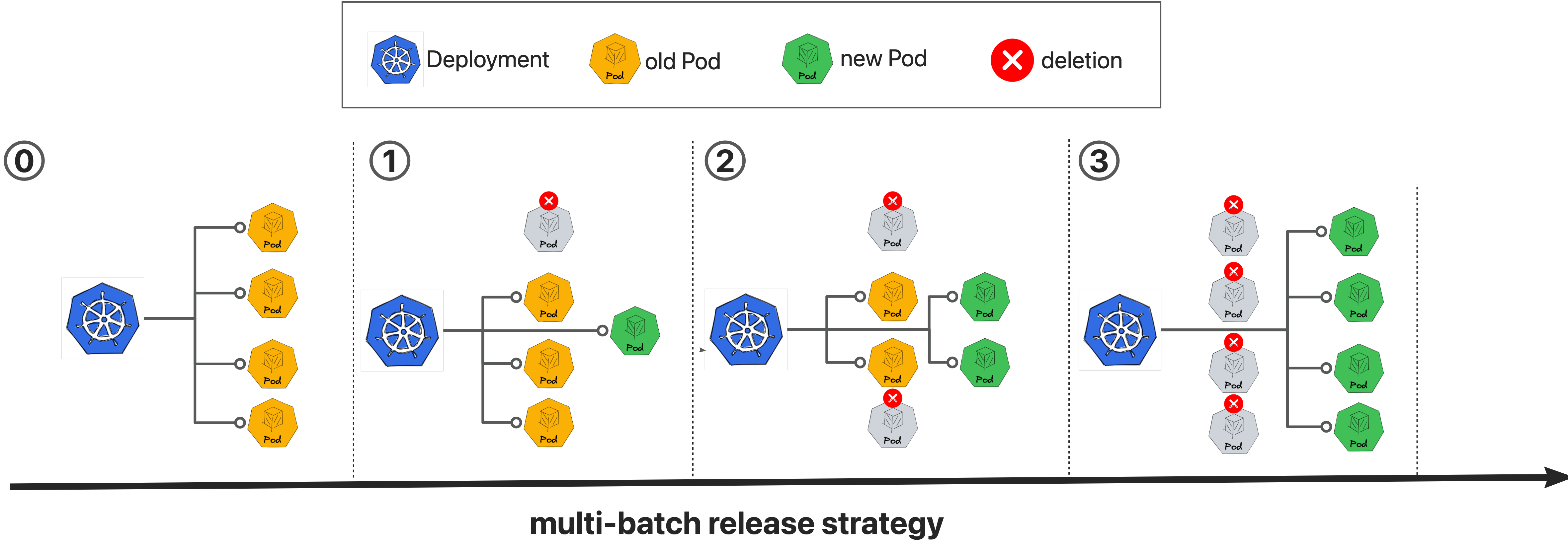
The multi-batch strategy executes rollouts in sequential phases, with each batch updating a specified number or percentage of pods. Manual approval gates between batches provide control points for validation before proceeding to subsequent phases.
Recommended Configuration
Note: The v1beta1 API is available from Kruise Rollout v0.5.0.
- v1beta1
- v1alpha1
apiVersion: rollouts.kruise.io/v1beta1
kind: Rollout
metadata:
  name: rollouts-demo
spec:
  workloadRef:
    apiVersion: apps/v1
    kind: Deployment
    name: workload-demo
  strategy:
    canary:
      enableExtraWorkloadForCanary: false
      steps:
      - replicas: 1
      - replicas: 50%
      - replicas: 100%
apiVersion: rollouts.kruise.io/v1alpha1
kind: Rollout
metadata:
  name: rollouts-demo
  annotations:
    rollouts.kruise.io/rolling-style: partition
spec:
  objectRef:
    workloadRef:
      apiVersion: apps/v1
      kind: Deployment
      name: workload-demo
  strategy:
    canary:
      steps:
      - replicas: 1
      - replicas: 50%
      - replicas: 100%
Supported Workload Types
The multi-batch strategy is compatible with the following Kubernetes workload resources:
- Deployment
- StatefulSet
- DaemonSet (Rollout v1beta1 only)
- Kruise Advanced StatefulSet
- Kruise Advanced DaemonSet
- Kruise CloneSet
Behavior Explanation
When applying a new revision to workload-demo, the rollout progresses through the defined batches as follows:
1Pods will be updated andreplicas-1Pods is still at stable revision in the 1-st batch, need manual confirmation to next batch.50%Pods will be updated and50%Pods is still at stable revision in the 2-nd batch, need manual confirmation to next batch.100%Pods will be updated and0Pods is still at stable revision in the 3-rd batch.
Different from canary release strategy, No extra Deployment is created during rollout progressing.
MinReadySeconds Strategy (Alpha)
Native Deployments can use an alternative multi-batch strategy based on the Deployment's own minReadySeconds field. It is an alpha feature selected by the MinReadySecondsStrategy feature gate, which is disabled by default.
Why This Strategy Exists
Kubernetes treats a Pod as Available only after it has stayed Ready for minReadySeconds. The default multi-batch path for native Deployments pauses the workload and rewrites spec.strategy.type to Recreate, so the Rollout controller can drive partitions itself. That works, but it mutates a destructive field: if the Rollout controller or webhook is unavailable before the original strategy is restored, a later pod-template update can be handled by the native Deployment controller with Recreate semantics.
The MinReadySeconds strategy never changes strategy.type. Instead it inflates minReadySeconds so newly updated Pods become Ready but stay not Available, then widens maxUnavailable batch by batch. The native RollingUpdate controller keeps replacing Pods; Rollout only gates the pace. In the worst case Pods remain Ready-but-not-Available — they are never recreated en masse.
How to Enable
Enable the feature gate via the Helm rollout.featureGates parameter when installing or upgrading kruise-rollout:
$ helm install kruise-rollout openkruise/kruise-rollout \
  --set rollout.featureGates="AdvancedDeployment=true,MinReadySecondsStrategy=true"
Or, on an existing installation, patch the controller manager args:
$ kubectl patch deployment kruise-rollout-controller-manager -n kruise-rollout --type='json' \
  -p='[{"op": "replace", "path": "/spec/template/spec/containers/0/args/1", "value": "--feature-gates=AdvancedDeployment=true,MinReadySecondsStrategy=true"}]'
Once enabled, every partition-style Deployment rollout in the cluster uses the MinReadySeconds strategy. The Rollout CR shape is unchanged:
apiVersion: rollouts.kruise.io/v1beta1
kind: Rollout
metadata:
  name: rollouts-demo
spec:
  workloadRef:
    apiVersion: apps/v1
    kind: Deployment
    name: workload-demo
  strategy:
    canary:
      enableExtraWorkloadForCanary: false
      steps:
      - replicas: 1
      - replicas: 50%
      - replicas: 100%
How It Differs from the Default Strategy
HPA / external scaling and PodDisruptionBudgets work with both strategies. A paused Deployment still processes replica changes, so Recreate-based rollouts are not frozen for HPA; PDBs continue to apply as well. The real difference is how each strategy mutates the Deployment and who drives the update.
| What changes on the Deployment | Default (Recreate-based) | MinReadySeconds |
|---|---|---|
spec.paused | Set to true (native update controller paused) | Left false (native controller keeps running) |
spec.strategy.type | Rewritten to Recreate | Left as RollingUpdate |
spec.minReadySeconds | Unchanged | Inflated for the duration of the rollout |
spec.progressDeadlineSeconds | Unchanged | Inflated for the duration of the rollout |
spec.strategy.rollingUpdate.maxUnavailable | Cleared with RollingUpdate; partition is driven by Rollout | Inflated, then advanced batch by batch |
spec.strategy.rollingUpdate.maxSurge | Driven by the Rollout controller | Left to the native Deployment controller (the user-configured value is respected) |
| Annotations | Rollout progressing markers | Plus three rollouts.kruise.io/original-* snapshots (see below) |
| Batch readiness | Waits until updated Pods are Ready | Waits until updated Pods are Available under the original minReadySeconds |
| Controller outage during rollout | Pods stop advancing until Rollout recovers; leftover Recreate is the hazard if someone then edits the pod template | Native Deployment controller keeps updating within the current maxUnavailable budget |
During a MinReadySeconds rollout the controller snapshots the user's minReadySeconds, progressDeadlineSeconds, and maxUnavailable into:
rollouts.kruise.io/original-min-ready-secondsrollouts.kruise.io/original-progress-deadline-secondsrollouts.kruise.io/original-max-unavailable
It then inflates those three spec fields so it can own the rollout pace, and progressively raises maxUnavailable to drive each batch. After the rollout finishes, the original fields are restored and the annotations are removed.
Because progressDeadlineSeconds is inflated, the native Deployment controller does not set the ProgressDeadlineExceeded condition while MinReadySeconds is in control. A long-running batch is therefore not reported as a failed native Deployment rollout. Watch the Rollout / BatchRelease status (and the MinReady stuck / degraded signals) instead of that Deployment condition.
Operation Notice
Do not edit the rollouts.kruise.io/original-* annotations by hand. They are the restore contract: if they are deleted or corrupted, the rollout is marked degraded and pauses until you intervene (restore the annotations, or cancel / finalize the rollout so the original fields can be recovered).
During the rollout, also do not expect manual edits to minReadySeconds, progressDeadlineSeconds, or maxUnavailable to stick. Those spec fields are owned by the MinReadySeconds controller: admission re-inflates the availability fields, and maxUnavailable is converged back to the current batch budget. Change the Rollout steps if you need a different pace; wait until the rollout finishes if you need to change the Deployment's own availability settings.
Behavior Notes
- Batch progress: each batch increases
maxUnavailableup to the batch target; the controller waits for the updated pods to become available under the originalminReadySecondsbefore widening the budget. With a large batch after a small canary, the budget advances in sliding windows of the user's originalmaxUnavailableinstead of one jump. - Rollback / continuous release: works the same way as the default strategy; original availability fields are refreshed on re-inflation.
- Upgrade compatibility: if the controller is upgraded to enable the gate while a Deployment is mid-rollout under the previously-started Recreate-based strategy, that in-progress release keeps the Recreate strategy until it finishes, instead of being switched mid-flight.
- Gate off mid-rollout: a Deployment still carrying the
rollouts.kruise.io/original-*annotations keeps using the MinReadySeconds controller until finalized, so it restores the original fields cleanly instead of being stranded. - Limitations (alpha): the strategy applies to native Deployments only; other workload types (CloneSet, StatefulSet, DaemonSet) keep the default partition strategy.
strategy.type=Recreateon the user Deployment is rejected and reported as degraded.